之前使用的是 docker (fava) + webhook (git 仓库) + openresty (auth0) 方案, 后面迁移到 kubernetes 上了,重新整理下方案
整体方案
![]()
- oauth2-proxy 作为应用入口(通过 oidc 配置 auth0)
- fava 运行 beancount 的 fava webui
- git-sync 定时同步 beancount 的 git 仓库,跟 fava 使用同一个 volume
beancount 仓库
使用 volume 共享
1
2
3
| volumes:
- name: ledger-volume
emptyDir: {}
|
之前为了解决国内访问 GitHub 速度问题,把 beancount 的仓库也同步提交国内仓库了,但是中途切换过多个供应商,配置 webhook 不方便,换成定义拉去的方案
1
2
3
4
5
6
7
8
9
10
11
12
13
14
15
16
17
18
19
20
21
22
23
| - name: git-sync
image: ...
env:
- name: TZ
value: Asia/Shanghai
- name: GITSYNC_REPO
value: https://xxxx/accounting.git
- name: GITSYNC_REF
value: master
- name: GITSYNC_ROOT
value: /tmp/git
- name: GITSYNC_USERNAME
value: ...
- name: GITSYNC_PASSWORD
value: ...
- name: GITSYNC_PERIOD
value: 60s
securityContext:
runAsUser: 1000 // 注意跟 fava 容器使用相同用户
volumeMounts:
- name: ledger-volume
mountPath: /tmp/git
|
fava 镜像
可以使用社区的镜像或者自行构建,这是我使用的 Dockerfile
1
2
3
4
5
6
7
8
9
10
11
12
13
14
15
| - name: fava
image: docker.cnb.cool/dongfg/packages/fava:1.30.12-260507
imagePullPolicy: IfNotPresent
ports:
- containerPort: 5000
env:
- name: TZ
value: Asia/Shanghai
- name: FAVA_PORT
value: "5000"
- name: BEANCOUNT_FILE
value: /data/accounting.git/main.bean // accounting.git 是默认的仓库名, 可以通过 GITSYNC_LINK 指定
volumeMounts:
- name: ledger-volume
mountPath: /data
|
oauth2-proxy
解决 fava 没有 auth 模块的问题,我是用的是 auth0
1
2
3
4
5
6
7
8
9
10
11
12
13
14
15
16
17
18
| - name: oauth2-proxy
image: docker.cnb.cool/dongfg/packages/oauth2-proxy:v7.15.2
imagePullPolicy: IfNotPresent
ports:
- name: http
containerPort: 3000
protocol: TCP
args:
- "--http-address=0.0.0.0:3000"
- "--upstream=http://localhost:5000"
- "--provider=oidc"
- "--oidc-issuer-url=https://dongfg.auth0.com/"
- "--client-id=xxxxxx"
- "--client-secret=xxxx"
- "--cookie-secret=xxxx"
- "--email-domain=*"
- "--redirect-url=https://实际访问域名/oauth2/callback"
- "--whitelist-domain=.auth0.com" // 退出登录后重定向的域名,不配置时重定向不生效
|
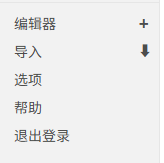
退出登录
为了方便在 fava 界面上退出,可以利用 fava 的 extension 功能添加一个退出登录的链接,下面是一个实现参考
1
2
3
4
| ├─exts
│ └─logout
│ └─__init__.py
│ └─Logout.js
|
1
2
3
4
5
|
from fava.ext import FavaExtensionBase
class Logout(FavaExtensionBase):
has_js_module = True
|
1
2
3
4
5
6
7
8
9
10
11
12
13
14
15
16
17
| # Logout.js
export default {
onPageLoad() {
console.log("!!! Logout Extension Loaded !!!");
if (document.getElementById('fava-logout-btn')) return;
const aside = document.querySelector('aside .navigation:last-child');
if (aside) {
const className = aside.querySelector('li:last-child').className;
const logoutBtn = document.createElement('li');
logoutBtn.className = className;
logoutBtn.id = 'fava-logout-btn';
logoutBtn.innerHTML = `<a href="/logout" class="${className}">退出登录</a>`;
aside.appendChild(logoutBtn);
}
},
};
|
启用扩展
1
| 2026-05-07 custom "fava-extension" "exts.logout"
|
最终效果